PBA.pro-FD
The PBA.pro Framework and the PBA.pro Designer Component together form the
PBA.pro-FD, the core of any PBA.pro System.

- Specifications
- Documents
- Software
- Accessories
- Related Products
- Contact
- This component is mandatory for any PBA.pro based system.
The main task of the PBA.pro framework is to host PBA.pro components for setup and control of locally installed interface hardware as well as components which extend the PBA.pro functionality.
The PBA.pro-FD-NET is an optional extension of the PBA.pro-FD, which allows the use of remotely installed interface hardware over a network connection and supports 1 or more PBA.pro Clients, also connected via network.
A PBA.pro Client is a special version of the PBA.pro-FD for monitoring and visualization of data bus traffic and associated parameters on a remote machine, e.g. via a local network.
The PBA.pro Designer component is an easy to use drag and drop tool to design and build your own, user-defined dialogs for visualization and control of any PBA.pro information or data source. This allows to easily tailor the PBA.pro display and control features to meet individual and unique needs for any user application.
The PBA.pro Software install package from the ‘Software’ Tab of this page includes all PBA.pro components. Components to be installed can be selected by the user during the installation process. An individual PBA.pro license key enables the corresponding PBA.pro components.
- Data Sheet
- Release Notes
- User Manuals
- Video

- Windows
- Linux
PBA.pro ARINC429 Binary Label Editor
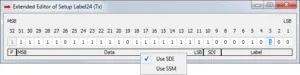
The PBA.pro ARINC429 Binary Label Editor is based on a python script and provides an extended label editor display to configure and visualise A429 labels bitwise in binary notation. If the script is executed, all label nodes in the PBA.pro ARINC429 resource component will provide an additional context menu entry called Extended Label Editor which will open this display if selected.For this accessory the PBA.pro Test and Script Manager component is mandatory.
Minimum required version: PBA.pro V02.51.
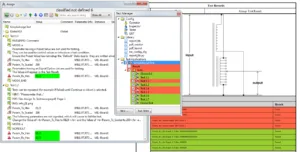
PBA.pro Assign To Test Manager
The concept of the Assign to Test Manager script accessory is to create a complete PBA.pro Test Manager project from an existing PBA.pro Parameter Assign. The Parameter Assign is typically used to display receive-parameter values and modify controllable send-parameters of any bus type. Furthermore, the Parameter Assign can check and validate received parameter values. On the other side the PBA.pro Test Manager provides functionality to execute tests, collect results and summarize it in a report file. The Assign to Test Manager combines Assign and Test Manger functionality and transfers an already existing Parameter Assign in a PBA.pro Test Application. This accessory requires the PBA.pro Test and Script Manager component.
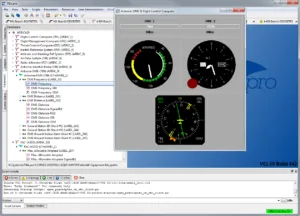
PBA.pro ARINC429 Equipment ID Label Database
The PBA.pro ARINC429 Equipment ID label databases accessory contains a set of PBA.pro database files (*.dbs) to import all EQ-IDs and labels with BNR and BCD formats as defined in ARINC Specification 429-19. The downloadable ARINC429 Equipment ID package provides a separate database file for each Equipment ID as well as a common database, which holds all Equipment IDs and its parameters. Furthermore, a quick guide about how to load and use the databases is included. This accessory requires the PBA.pro Database Manager component for ARINC429.
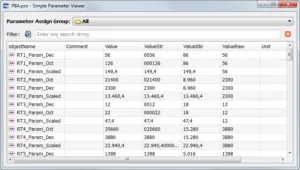
PBA.pro Parameter Display from Assign
The Parameter Display from Assign application provides a simple table display where parameters, placed in the PBA.pro Parameter Assign window, can be displayed. Just populate the PBA.pro Parameter Assign window and open this display (PBA.pro template) to get a very simple and straight forward parameter viewer. Furthermore, a drop down where all Assign groups are listed, as well as a filter string can be set up to filter for dedicated parameters only. This accessory is a PBA.pro Designer template and does not require further components.
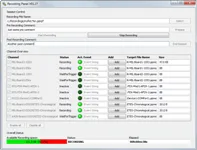
PBA.pro Recording Control Panel
The PBA.pro Recording Control Panel is created by a Python script and provides a graphical interface to control the PBA.pro recording functions on multiple streams.
For this accessory the PBA.pro Test and Script Manager component is mandatory.
Minimum required version: PBA.pro V02.42
PBA.pro Replay Control Panel
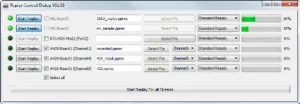
The PBA.pro Replay Control Panel is created by a Python script and provides a graphical interface to control the PBA.pro replay functions of multiple ports, channel or streams.
For this accessory the PBA.pro Test and Script Manager component is mandatory.
Minimum required version: PBA.pro V02.42.
PBA.pro SNMP (Simple Network Management Protocol) Browser
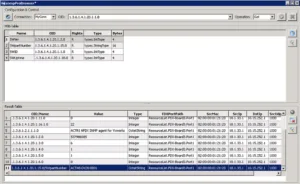
The PBA.pro SNMP Browser is an easy to use graphical user interface tool that combines the features of the PBA.pro AFDX®/ARINC664P7 component with the Python SNMP v1 library. The PBA.pro SNMP Browser acts as SNMP Management console to interactively send SNMP Get, Set, GetNext and Walk request messages to SNMP Agents in an AFDX®/ARINC664P7 network. The received response messages are evaluated and printed chronologically in a result table overview. This accessory requires the PBA.pro AFDX®/ARINC664P7 resource component and the PBA.pro Test and Script Manager.

PBA.pro License Server
The PBA.pro License Server can be used as an alternative licensing model to run the PBA.pro. It replaces the standard PBA.pro single seat key, which is entered in the PBA.pro license dialogue. The PBA.pro License Server allows starting the PBA.pro within the local network a dedicated amount of times. The amount of PBA.pro instances running at the same time on different PCs is related to a so called Floating License. To use this License Server, a corresponding PBA.pro License Server key is mandatory. Please ensure that you have a valid PBA.pro License Server key before installation. The PBA.pro Licencse Server is a Windows or LINUX standalone executable.
DACFF – Recording File Converter Tool
The AIM DACFF (Database Analyser Common File Format) is a converter tool to convert multiple types of recording files to PBA.pro compatible recording files and vice versa. the DACFF converter is a standanlone Windows executable. Currently supported files are:
- Recording files of AIM legacy analysers PBA (prc/hrc/xrc)
- PAA (arc) and fdXplorer (fcp)
- Chapter 10 HEIM recorder files for 1553, A429 and Standard Ethernet
- DACFF Recording files from other tools
- Wireshark pcap files
PBA.pro-Light Panels for MIL-STD-1553
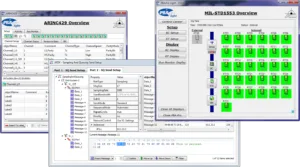
This accessory provides the PBA.pro-Light panels for users, holding a full PBA.pro framework and PBA.pro MIL-STD-1553 resource component license. PBA.pro-Light is the simple to use, quick and easy one click solution covering many typical user cases with the underlying core features of the PBA.pro.
The PBA.pro-Light panels can be used in two execution modes, either invoked via PBA.pro command line or via the GUI of the full PBA.pro license. The panels are implemented by the PBA.pro Designer without use of any scripting.
Minimum PBA.pro version required: 2.47
PBA.pro-Light Panels for ARINC429
This accessory provides the PBA.pro-Light panels for users, holding a full PBA.pro Framework and PBA.pro ARINC429 resource component license. PBA.pro-Light is the simple to use, quick and easy one click solution covering many typical user cases with the underlying core features of the PBA.pro.
The PBA.pro-Light panels can be used in two execution modes, either invoked via PBA.pro command line or via the GUI of the full PBA.pro license. The panels are implemented by the PBA.pro Designer without use of any scripting.
Minimum PBA.pro version required: 2.42
PBA.pro-Light Panels for AFDX®/ARINC664P7
This accessory provides the PBA.pro-Light panels for users, holding a full PBA.pro Framework and PBA.pro AFDX®/ARINC664P7 resource component license. PBA.pro-Light is the simple to use, quick and easy one click solution covering many typical user cases with the underlying core features of the PBA.pro.
The PBA.pro-Light panels can be used in 2 execution modes, either invoked via PBA.pro command line or via the GUI of the full PBA.pro license. The panels are implemented by the PBA.pro Designer without use of any scripting.
Minimum PBA.pro version required: 2.48

Test and Script Manager Component
See details
User Administration Component
See details
3rd Party & Utility Components
See detailsFind your nearest AIM Office/Representative or Contact/Quote/Support Forms

If you are already registered please log in. Alternatively, please create your account!
Forgot password?
The file you are trying to access requires you to be logged in as a registered user. Registration is free, create your account!